How do I register a domain name?
How do I transfer a domain name?
How do I change the name servers?
How do I add DNS records (Belnet nameservers)?
How do I set up DNSSEC?
How do I choose a domain name?
Which country code extensions should I register?
Which domain name extensions should you register?
TLDs or extensions?
How does the transfer of a .be domain name work?
How do I set up an ALIAS record?
How do I enable the MFA layer to strengthen the security of my authentication processes?
How do I register a domain name?
Registering a domain name can be completed in 4 easy steps.
1. Check if the domain name is still available for registration
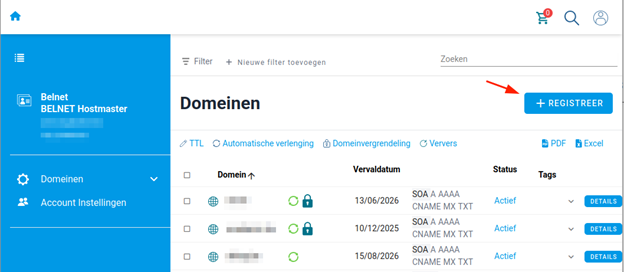
In your domain names overview, click on '+ REGISTER'.
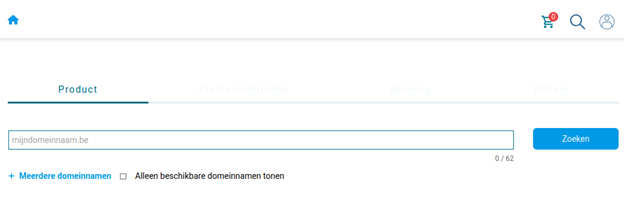
Enter the domain name you would like to register and click 'Search'.
Note: Looking up multiple domain names? Click '+ Multiple domain search'. You can check up to 20 domain names at once.
2. The availability of the domain name
You will see whether your domain name is available in .be and 10 other common domain name extensions.
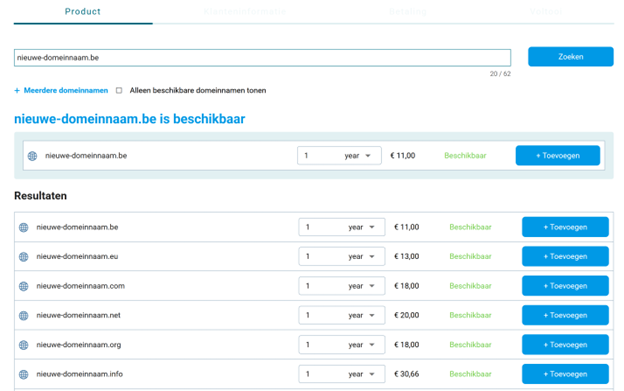
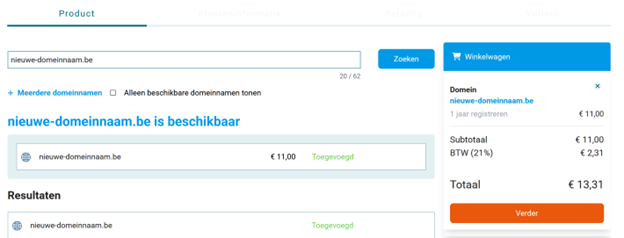
Adjust the registration period of the domain name (or domain names) as desired and click '+ Add' to put it in your shopping cart. Finished with your selection? Then click 'Continue' on the right in your shopping cart.
3. Fill in the registration details
Fill in all the registration details for the domain name. Make sure all information is correct. Click the box to agree to the general registration terms.
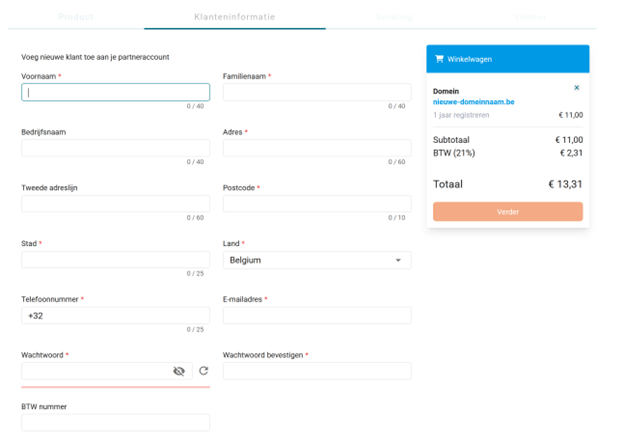
4. Complete registration
Click 'Continue’ to complete the order. Usually, the domain name becomes active within a few minutes. The payment is made via your annual invoice.
5. Points of attention after registration
- You may need to validate your email address by responding to an email from the Registry (e.g., DNS Belgium).
- Don't forget to configure your DNS servers.
- Enable the 'Registrar Lock' to protect your domain name from being transferred.
How do I transfer a domain name?
Transferring a domain name works as follows.
1. Check the status and information
- Verify the current email address associated with the domain name. The transfer code you need to authorize the transfer will be sent to that email address for .be domains. If it is no longer correct, contact your current registrar to change it.
- Also check if the domain name is locked. When your domain name is locked, you cannot transfer it.
2. Request the transfer code
A transfer code is required to authorize the transfer of the domain name. You can request it in 2 ways:
- Ask your current registrar to request the transfer code and send it to you.
- Go to the DNS Belgium website, search for the domain name, and click on 'Request transfer code'. It will be sent to the current email address of the domain name holder.
3. Initiate the transfer
Search for the domain name you want to transfer through the control panel. The lookup will indicate that it is already registered. Click on 'Transfer to Belnet' to start the transfer.
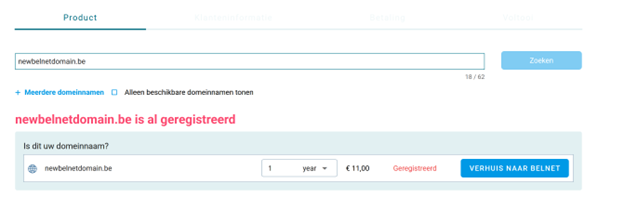
You are now asked for the transfer code. Enter it or copy it into the box to proceed.
Note: Under 'Advanced settings' you can also choose the name servers. We recommend choosing the name servers of Belnet.
4. Completing the transfer
Is the transfer code correct? Then you can complete the transfer of your domain name.
Check the details of the domain name holder to make sure they are correct. Once you have made the payment, the domain name will be transferred. Services such as a mailbox and website linked to the domain name remain active during this process.
Note:
- A .be domain is transferred immediately if the transfer code was correct
- Transferring other extensions can take up to 7 days. Often, you can already find the status 'Pending Transfer' in the WHOIS.
How do I change the name servers?
Nameservers provide the link between a domain name and an IP address. You have 3 options:
- Use Belnet's nameservers
- Use your own nameservers
- Use Belnet's nameservers as secondary nameservers
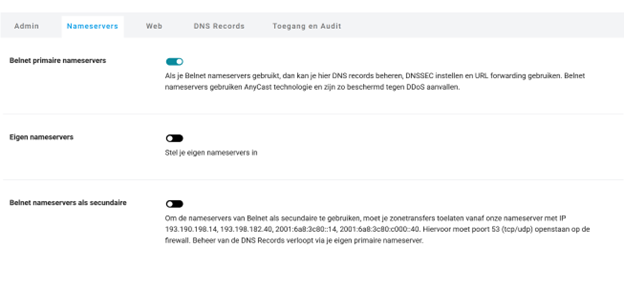
1. Use Belnet's nameservers
Belnet's nameservers are active by default for your domain name. Have you used other nameservers and want to switch to Belnet's? Here's how:
- In the control panel, select the domain name for which you want to change the nameservers.
- Click on the Nameservers tab.
- Toggle the switch next to 'Our nameservers' to on.
2. Use your own name servers
Would you rather use your own nameservers?
- In the control panel, select the domain name for which you want to change the nameservers.
- Click on the Nameservers tab.
- Toggle the switch next to 'Own nameservers' to on and enter your own nameservers. Note: you must set at least 2 nameservers.
3. Use Belnet's nameservers as secondary nameservers
Do you only have one own nameserver? Then you can enable Belnet's nameservers as secondary (or slave) nameservers.
- In the control panel, select the domain name for which you want to change the nameservers.
- Click on the Nameservers tab.
- Toggle the switch next to 'Secondary nameservers' to on.
- Enter the IP of your own primary nameserver.
- Add your own nameservers (optional).
- Save the settings by clicking on 'Activate secondary nameserver'.
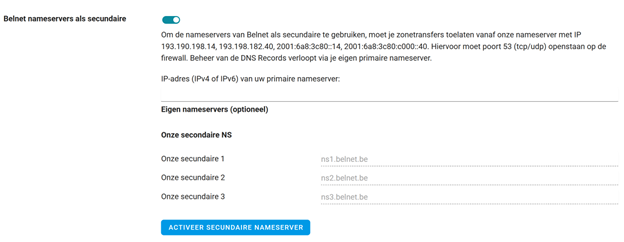
Note: you must allow zone transfers from our nameservers with the following IP addresses:
- ns1.belnet.be: 193.190.198.14 / 2001:6a8:3c80::14
- ns2.belnet.be: 193.190.182.40 / 2001:6a8:3c80:c000::40
Once the secondary nameservers are set up, you can check via the control panel which data is stored on the secondary nameservers. If you want to make changes, you must do so on your own nameserver.
How do I add DNS records (Belnet nameservers)?
The Domain Name System (DNS) plays a key role on the Internet. It essentially acts as a large phone book, linking domain names to IP addresses.
Through DNS records, you can set up or connect various services to your domain name. The most common DNS records are:
- A record: to link web hosting to your domain name (IPv4)
- AAAA record: to link web hosting to your domain name (IPv6)
- CNAME record: to link two hostnames together
- MX record: for email traffic
- TXT record: to set up SPF, DKIM, or DMARC records (email security), or to connect services like Microsoft 365 to your domain name
- NS record: contains information about the active nameservers
- SRV record: to link specific services, such as VoIP and XMPP, to your domain name
- CAA record: to secure an SSL certificate
- SOA record: contains essential DNS information about your domain name
How do you add DNS records yourself?
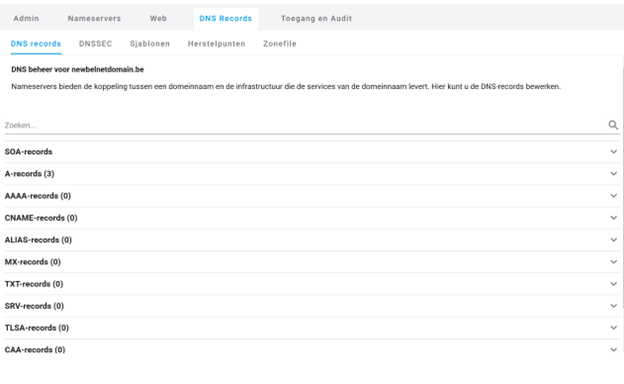
Do you use Belnet's nameservers? Then you can easily add, modify, or delete DNS records yourself via the control panel.
- Log in to the control panel and go to 'Active domain names'
- Choose the domain name on which you want to set DNS records
- Click on the 'DNS records' tab
- Go to the corresponding box and add a new DNS record, modify it, or delete it.
Note: it may take up to 60 minutes for the changes to become active or visible on the internet.
How do I set up DNSSEC?"
DNSSEC protects the DNS settings of your domain name. It prevents others from modifying DNS settings by securing them with a digital signature.
There are 2 ways to set up DNSSEC.
1. Setting up DNSSEC with Belnet nameservers
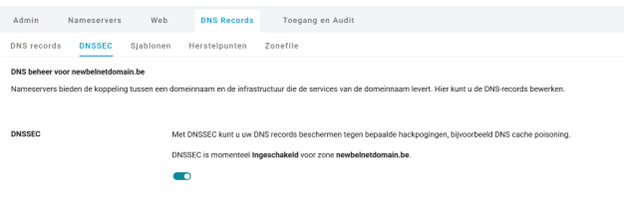
- Log in to the control panel and select the domain name for which you want to enable DNSSEC
- Click on the 'DNS Records' tab.
- Using the button at the top, you can enable or disable DNSSEC with a single click.
2. Setting up DNSSEC with your own nameservers
If you use your own nameservers, you also manage the digital signature that DNSSEC adds to the DNS records.
- Log in to the control panel and go to the domain name for which you want to enable DNSSEC.
- Click on the DNS records tab.
- Select the appropriate algorithm, paste the DNSSEC key into the field (which is generated on the nameservers), and click the box to check it.
Note: After you have added the DNSSEC key, it may take a few hours for the change to be processed.
How do I choose a domain name?
A domain name is the unique address of your website and can be used as the basis for professional e-mail addresses. Above all, a domain name depicts your online identity. That's why choosing a good domain name is an essential part of your internet strategy.
Your domain name is the first thing that potential visitors see in search engines, as a link on other websites, or on business cards. A visitor sees your domain name before they see your website. A domain name gives an important first impression. A domain name must be appealing, and not only to people. A domain name is also important for search engines.
Which country code extensions should I register?
We offer the most common TLDs such as .be or .com when registering a domain name. Not all the TLDs are visible on our interface, but if you want a specific TLD, you can contact us for pricing and we can enable it on the interface.
Which domain name extensions should you register?
For the domain name belnet.be, the extension or TLD is .be. There are two types of extensions, country code extensions and generic extensions.
TLDs or extensions?
Every country has its own country code extension. It is .be for Belgium, .nl for the Netherlands, .fr for France, et cetera. The extension is based on the two-letter ISO country code.
There are also countless generic extensions; most of them have a functional objective. For example, .com stands for commercial websites, .org for non-commercial organizations, etc.
How does the transfer of a .be domain name work?
If you want your domain name to be managed by a new registrar, you can transfer your .be domain name. For this, you need a transfer code. The procedure is as follows:
- Check your email address: you can check or request your email address from your current registrar. You will receive the transfer code via that email address.
- Unlock the domain name: a domain name that is locked (with a domain lock) cannot be transferred. Unlock the domain name with your current registrar before starting the transfer.
- Request the transfer code: you can request it from your current registrar or via DNS Belgium.
- Send the transfer code: provide the transfer code to your new registrar to initiate the transfer.
- Your new registrar submits the transfer request: the new registrar sends the transfer code to DNS Belgium. DNS Belgium will compare the transfer code with the one in its systems. If the code is correct, the move will be carried out immediately.
The transfer of a .be domain name is executed quickly and is usually completed within a few hours. During the transfer, your domain name, website, and mailbox remain active.its systems. If the code is correct, the transfer will be executed immediately.
How do I set up an ALIAS record?
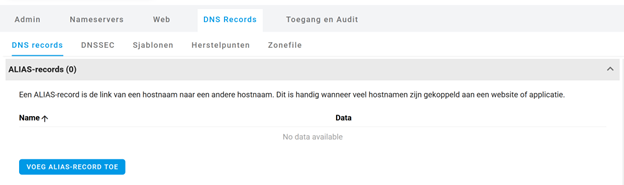
ALIAS records provide the reference of a hostname (a.belnet.be) to another hostname (b.mijn-cloud.be). They are similar to CNAME records but store the IP of the target in DNS. We update the target of the ALIAS record every hour.
Here’s how to set up an ALIAS record:
- Go to 'Active Domains' in the control panel.
- Select the domain on which you want to set up an ALIAS record.
- Go to 'DNS Records' and scroll to the 'ALIAS Records' section.
- Open the window and add the ALIAS record.
- Click save.
How do I enable the MFA layer to strengthen the security of my authentication processes?
Check out our documentation and demo videos on our Multi Factor Authentication (MFA) FAQ page.
Access to the Domain Name Registration interface